Shower Timer
A big, color-shifting countdown for the shower. Tap 5, 10 or 15 minutes and it starts at once, pings along the way and sounds a loud alarm at zero, so a long shower does not slip past you.
How to Use the Shower Timer
- Under How long is your shower?, tap 5 min, 10 min or 15 min. The countdown starts immediately.
- Leave the phone where you can see it. The time left shows as large MM:SS, and the background shifts from green through yellow to red as time runs out.
- Listen for the two-note ping at each interval.
- At zero the screen flashes red and shows Time's up! with a loud repeating alarm. Tap anywhere to stop it.
To finish early, tap Stop timer.
Shower Timer with Chimes Every Few Minutes
The switch Chime every 2 minutes plays a short ping at each interval, a nudge for when you zone out under the water. Switch it off if you only want the final alarm.
Set a Custom Shower Time
Tap Custom times to open a sheet with two fields:
- Total time (minutes): any length from 1 to 60.
- Chime every (minutes): 1 to 10, or 0 to turn the chimes off.
Tap Done to save. Your length then appears as an extra button above the presets, and the chime switch reads "Chime every minute" or "Chime every N minutes" to match.
Screen Stays On, Sound Made in Your Browser
While the timer runs it asks your device to keep the screen awake, so the countdown stays visible. The pings and alarm are generated in your browser. Turn the volume up before you start, since the shower is noisy.
Private and Free
There is no account and nothing is uploaded. Your chosen lengths are remembered on this device only.
Shower Timer FAQ
What is a shower timer?
A shower timer is a countdown that tells you how long you have been in the shower. This one fills the screen with the time left, pings at set intervals and sounds an alarm at zero, so you notice even when you are not watching.
How do I set a timer on a shower?
Tap 5 min, 10 min or 15 min under "How long is your shower?" and the countdown starts at once. For another length, tap Custom times, enter the Total time (minutes) from 1 to 60 and tap Done.
Is there a way to put a timer on a shower without buying a device?
Yes. Prop your phone somewhere dry and open this page. It needs no hardware, and the large MM:SS countdown is meant to be readable from across the bathroom.
Can I set a shower timer for 5 minutes?
Yes. Tap 5 min. The screen starts at green, turns yellow and ends red as the time runs out, then the alarm sounds at zero. 10 min and 15 min work the same way.
How do the shower timer chimes work?
With Chime every 2 minutes switched on, a short two-note ping plays at each interval. In Custom times, set Chime every (minutes) from 1 to 10, or 0 to turn the chimes off.
How do I stop the shower timer alarm?
At zero the screen flashes red and shows Time's up! with a repeating alarm. Tap anywhere on the screen to stop it. To end a countdown early, tap Stop timer.
Will my phone screen stay on during the timer?
Yes, where your browser supports it. The timer asks the device to keep the screen awake while it counts down. Keep the page open and in front for this to work.
Is the shower timer free, and is anything stored?
It is free and needs no account. The sounds are made in your browser and nothing is uploaded. Your chosen lengths are remembered on your own device only.
Recommended
-
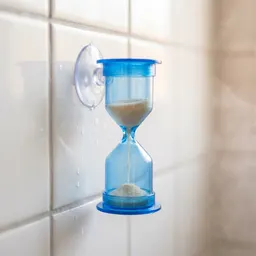 5-Minute Sand Timer with Suction Cup
A no-battery backup that sticks to the tile and runs out when your time does.
-
 Soundcore Select 4 Go Shower Speaker
Waterproof and loud enough to hear over the water, for music or your alarm.
-
 HOPOPRO 5-Mode High Pressure Shower Head
Strong pressure in a shorter shower, so five minutes feels like enough.
Helps keep the tools free. ✨
Images are for illustration only. As an Amazon Associate I earn from qualifying purchases.


